How to Turn Your Audio Guestbook Into a Private Listening Page With Claude
Stop sending a zip file
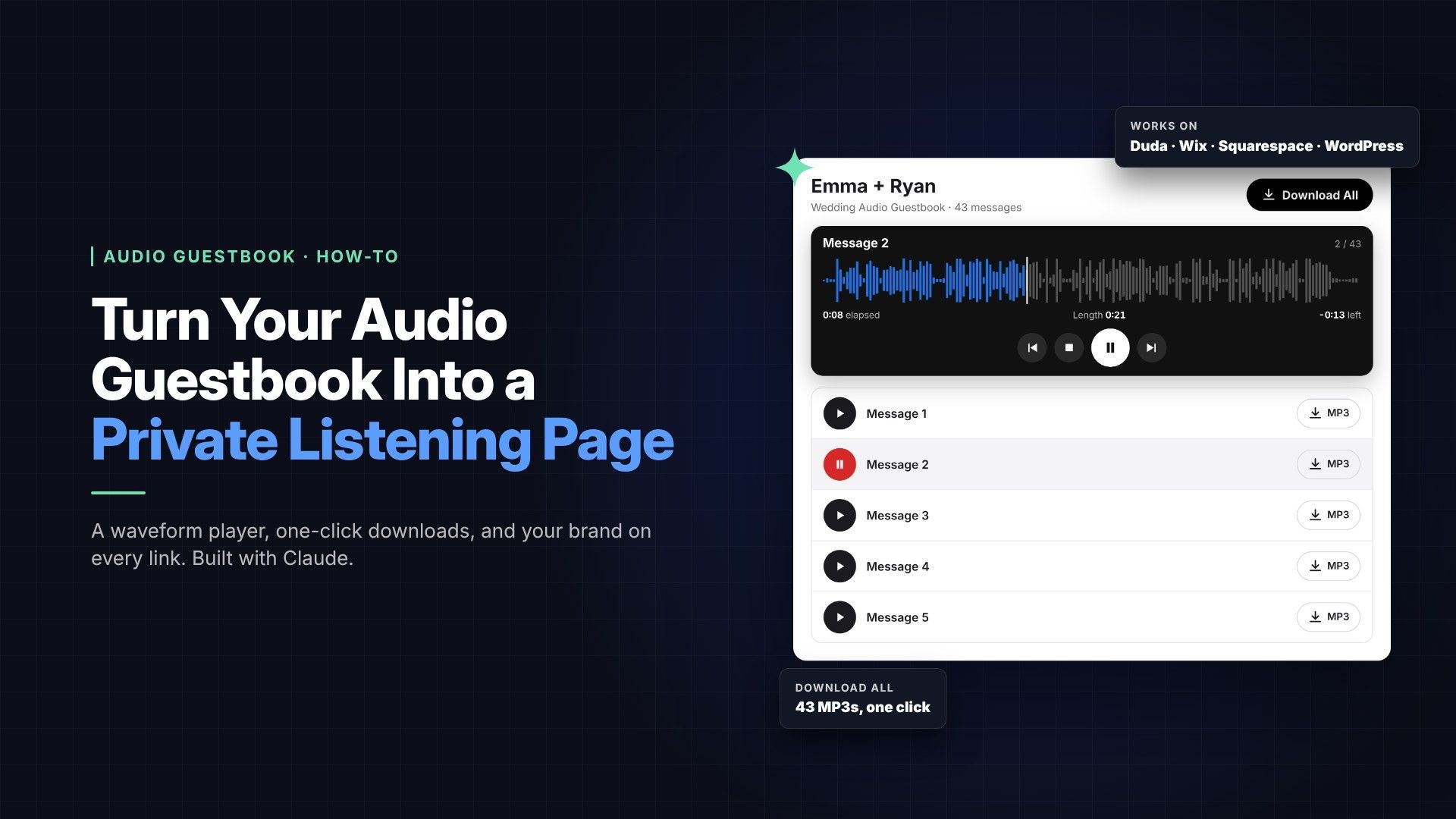
You can turn a couple's audio guestbook into a private, branded listening page on your own website in under an hour, using Claude to do most of the work. I did it for a wedding the day after the event: 43 voicemails, their photo at the top, a waveform player, and one button to download everything.
Most of us still deliver guestbook audio as a zip file or a shared folder. It works, but it's a list of numbered files with no names, no context and nothing that says who made it. A listening page fixes all three, and every time the couple shares the link with family, your business name comes along with it.
This is an especially good fit if your guestbook phones don't have Wi-Fi built in. Some brands sell an all-in-one package: the phone uploads messages straight to the maker's own software, which builds the client's listening page for you. If your phones just save MP3s to a memory card, you've been left with the zip file. This guide gives you that same polished client page, hosted on your own website, with no extra subscription for the phone.
This guide walks through exactly how I built it with Claude, Anthropic's AI assistant, and how to put the same page on Duda, Wix, Squarespace, WordPress or almost any other website builder.
What the finished page includes
The whole page is one block of code you paste into your site, and everything below lives inside it.
- The couple's photo across the top, with their names and the event date under it
- A waveform player that draws each message's sound wave; the played part changes color and a line moves across as it plays
- Click or drag the waveform to jump to any spot in a message
- Time readouts for elapsed, total length and time left
- Previous, stop, play/pause and next buttons, and messages play one after another automatically
- A list of every message(Message 1, Message 2…), with the playing one highlighted
- An MP3 button on each message to download just that one
- A Download All button that hands the client every message in one zip file
- Phone lock-screen controls, so clients can play and skip messages from the lock screen or their headphones
It works on phones, tablets and computers, and you can change the colors to match your brand.
What you need
You need four things, and you probably have three of them already.
| What | Why | Notes |
|---|---|---|
| The event's MP3 files | The messages themselves | Straight off your guestbook phone |
| A Dropbox account | Hosts the audio and gives each file a link | The free plan works for small events. New to Dropbox? Sign up with my referral link and we both get bonus storage |
| Claude, on a paid plan | Builds the page, makes the links, can edit your site | Connectors like Dropbox need Pro, Max, Team or Enterprise |
| A website you can add code to | Where the page lives | Duda, Wix, Squarespace Core and up, self-hosted WordPress and more (see Step 4) |
Inside Claude, three features do the heavy lifting:
- The Dropbox connector lets Claude create folders and look up links in your Dropbox. Turn it on under Customize, then Connectors.
- Claude in Chrome lets Claude click through websites in your own browser, where you're already signed in to Dropbox and your website builder.
- The Claude desktop app lets Claude read a folder on your computer once you allow it, so it can see your event files.
Step 1: Get the files ready
Copy the MP3s off the guestbook phone into one folder per event, and name files so they're clearly that client's.
- Copy the event's MP3s into a folder on your computer, for example
11.14.26 Smith. - Listen to or delete blank calls and hang-ups first. Gaps in the numbering are fine; the page numbers messages 1, 2, 3 in order.
- Add the client's name to the front of every file name, so
0001.MP3becomesSmith-0001.MP3. When the couple downloads a message, it arrives with their name on it.
Claude can do the renaming. Connect the folder in the Claude desktop app and ask: "Add 'Smith-' to the front of every file name in this folder."
Also pick the photo you want at the top, usually a favorite from your photo booth. A landscape shot works best.
Step 2: Put the audio on Dropbox and make it shareable
Each event gets its own Dropbox folder with an "anyone with the link can view" link, and every MP3 gets its own link too.
- Ask Claude to make the folder. With the Dropbox connector on: "Create /Audio Guestbook/11.14.26 Smith in my Dropbox." Use one subfolder per event, so each client's Download All only grabs their own messages.
- Drag the MP3s in yourself on dropbox.com. This is the one step Claude can't do for you: the connector can't upload files, and browser uploads need your own approval. It takes about a minute.
- Drag in the photo too, into the main Audio Guestbook folder rather than the event folder, so it isn't part of the zip.
- Let Claude share the folder. Ask: "Set that folder's link to anyone with the link can view." Claude does this on dropbox.com in your Chrome and asks before changing any sharing setting.
- Let Claude make a link for every file. Ask: "Create a public link for every MP3 in that folder and for the photo."
How Claude handles step 5 is worth knowing. The Dropbox connector can only create private links, which won't play for your clients. So Claude opens the folder on dropbox.com in Chrome, clicks Copy link on each file (43 clicks for my wedding, done in about a minute), and then uses the connector to read every link back and check it's public with downloads allowed.
Step 3: Have Claude build the player
You describe the page in plain English, and Claude writes one self-contained block of HTML with the player, styles and all the Dropbox links filled in.
Here's a prompt you can copy and adjust:
 Build me an audio guestbook listening page as one block of HTML
I can paste into my website builder's HTML/embed widget.
- Photo at the top: [Dropbox link to the photo]
- Title: Emma + Ryan
- Under the title: Wedding Audio Guestbook · [date] · and the message count
- A Download All button (black, white text) using this Dropbox folder link: [link]
- A player with the waveform of the current message; click the waveform to seek
- Show time elapsed, total length and time left
- Buttons: previous, stop, play/pause, next; play messages back to back
- A list of every message (Message 1, Message 2...) with play and MP3 download buttons
- Highlight the playing message with a red circle; played part of the waveform in blue
- Must work on phones
- Use only the MP3 links in this Dropbox folder: [folder name]
A few things Claude handled that you'd otherwise trip over:
- Dropbox links need adjusting. A normal share link opens Dropbox's preview page. Claude rewrites each link so it streams in the player, and a second version so the MP3 button downloads the file instead of opening it.
- The waveform needs a special link. To draw a waveform, the browser has to read the audio file itself. Claude tested this and found Dropbox allows it only through its direct-download address, so the player uses that.
- A backup if the waveform can't load. The player falls back to a line with a dot that moves along as the message plays.
Ask for changes in plain words, like "make the Download All button black" or "show the time left." Claude edits the code, and if it's connected to your site, it updates the page too.
Save the finished code as your template. For the next event, give Claude the new folder, photo, names and date. It swaps those into the template and keeps the player exactly the same.
Step 4: Add it to your website
Any builder that lets you paste HTML with JavaScript can host the page. Make a new page, add the builder's HTML or code element, and paste the whole block in.
| Builder | Where to paste | Plan needed | Watch out for |
|---|---|---|---|
| Duda | Elements → HTML widget | Any | Publishing one page on its own needs Duda's Agency plan; otherwise Republish pushes the whole site live |
| Wix | Add Elements → Embed Code → Embed HTML | Any | Code runs inside a box with a fixed height you set; make it tall enough for the whole list |
| Squarespace | Add Block → Code | Core or higher | On Basic the script won't run and the player stays blank |
| WordPress (self-hosted) | Custom HTML block | Any | You need an admin account; some security plugins strip scripts |
| WordPress.com | Custom HTML block | A plugin-enabled plan | On lower plans the script is removed when you save |
| Others (Showit, GoDaddy, Webflow…) | Any embed or custom HTML element | Varies | Look for an element that allows scripts, not just iframes |
Letting Claude do it. With Claude in Chrome, Claude can work in your builder directly. On my Duda site it created the page, added the HTML widget, pasted the code, hid the page from the menu and turned off search indexing. It then tested play, next and stop in Duda's preview. It asks before anything goes live. Try: "Create a page called Smith Audio Guestbook on my site, add this code, and hide it from the menu."
On Wix, ask Claude for a version where the message list scrolls inside a set height. The page then fits a fixed-height box cleanly on phones and computers.
On any builder, keep the page out of your menu and out of search engines. In Duda that's Hide from Navigation plus Page SEO → no index. Most builders have similar settings in the page's SEO options.
Step 5: Test it, publish it, send it
Check the page on a phone before the client sees it, then send one link.
- Preview it. Play a message, skip to the next, stop, and drag along the waveform. Tap one MP3 button and Download All to confirm the files arrive.
- Check it on your phone. Most couples open it there first.
- Publish. Remember that on Duda without the Agency plan, Republish pushes every pending change on your site live.
- Open the live link in a private window, where you're signed out of everything. That's exactly what your client will see.
- Send it. Ask Claude to draft the message, for example: "Your audio guestbook is ready! Listen to every message, or download them all, here: [link]. Congratulations again from all of us."
Give the page a simple address, like yoursite.com/smith-audio-guestbook
, so it's easy to share in a text.
Privacy, tips and troubleshooting
These are guests' personal messages, so treat the page like a private gallery: unlisted, unindexed, and shared only with the client.
- Anyone with a link can listen. The page is hidden, not locked, and the Dropbox links work for anyone who has them. Want it locked? Most builders can password-protect a single page: Duda (Set Page Access → Password protected), Wix, Squarespace and WordPress all have a page password setting. Send the client the link and the password together. For individual logins per client, use your builder's members area instead (Duda Membership, Wix Members, Squarespace Member Areas, or a WordPress membership plugin).
- Set an end date. Tell clients how long the page stays up, and turn off the Dropbox links when you take it down.
- Ask before you showcase. Get the couple's OK before using their page in your marketing.
| Problem | Likely cause | Fix |
|---|---|---|
| Player is blank | Your plan or role blocks scripts | Check the plan column in Step 4 |
| Messages won't play | A Dropbox link is still private | Set the folder and files to "anyone with the link" |
| No waveform, just a line | The browser couldn't read the file | It still plays; ask Claude to check the links use Dropbox's direct-download address |
| Download All opens Dropbox instead of downloading | The folder link isn't set to download | Ask Claude to fix the Download All link |
| Page cut off on Wix | The embed box is too short | Make the box taller, or use the scrolling-list version |
| Doesn't work in the editor | Some builders don't run code while editing | Use Preview or the live page |
Caveats: Dropbox, your plan, and Google Drive
The page is only as permanent as the place the audio lives. If a Dropbox link stops working, that message goes silent on the page, so plan for it.
If you stop paying for Dropbox. Your account drops to the free Basic plan with 2 GB of storage. Existing files stay viewable at first, but an over-quota account stops syncing and uploading. Stay over the limit for an extended period and Dropbox can delete files to bring you back under it. Every client page that uses those files would break.
Daily sharing limits. Dropbox caps how much your shared links can serve each day: 20 GB and 100,000 downloads on Basic, 1 TB on paid plans. Go over and your sharing is paused for 24 hours, longer if it repeats. A typical event is small (my 43-message wedding was about 15 MB), so this matters only on a free account serving many busy clients at once.
Links are tied to sharing. Turning off a folder's sharing, deleting a link or deleting the files breaks the page. Keep a dedicated Audio Guestbook folder you never clean out while pages are live.
Can you use Google Drive instead? Not reliably. A Drive share link opens Google's preview page, not the audio file. Workarounds that turn it into a direct link exist, but site builders and plugin makers report Google breaking those links for audio players. A Drive folder link also can't be a one-click Download All. I built and tested this player on Dropbox only.
| Where the audio lives | Waveform | One-click Download All | Main risk |
|---|---|---|---|
| Dropbox (tested) | Yes | Yes | Lapsed plan or deleted links break the page |
| Your website builder's file manager | Depends on the builder | Upload a zip yourself | Builder storage limits; untested |
| Google Drive | Unlikely | No | Google can break direct audio links |
| Cloud storage (Amazon S3, Cloudflare R2, Bunny) | Yes, if set up for it | Upload a zip yourself | Needs more setup; untested |
Whichever you choose, protect yourself and the client:
- Keep your original MP3s backed up somewhere other than the page's storage.
- Tell clients how long the page will stay up, for example one year.
- Encourage them to use Download All right away, so they own a copy no matter what.
Can you just upload the audio to your website?
Yes, and it removes Dropbox from the picture: the audio lives as long as your site does, at no extra cost beyond the plan you already pay for. The trade-offs are file limits, more manual uploading, and a player I haven't tested on each builder's file storage.
| Builder | Limit per file | Storage included | Good to know |
|---|---|---|---|
| Duda | Not clearly published | Not clearly published | Every uploaded file is public to anyone with its link |
| Wix | Set per file type | Free 500 MB, Light 2 GB, Core 50 GB, Business 100 GB | If the plan ends, the site keeps running but you can't upload more |
| Squarespace | 20 MB for linked files; 160 MB in an Audio Block | Not capped by plan | The 20 MB limit also applies to a Download All zip |
| WordPress (self-hosted) | Set by your web host | Your hosting plan's disk space | Large uploads may need your host to raise the limit |
| WordPress.com | Up to 2 GB, within remaining space | Free 1 GB, Personal 6 GB, Business 50 GB | Scripts need a paid plan (Step 4) |
Things to weigh before you switch:
- Size is rarely the problem. Guestbook messages are tiny; my 43 messages totaled about 15 MB. Even 100 weddings fit easily on most paid plans.
- Download All needs a zip you upload. Builders can't zip a folder on the fly the way Dropbox does. Zip the event folder and upload it as one file. On Squarespace, that zip must be under 20 MB.
- More uploading by hand. You upload every MP3 into the builder's media library, then collect each file's address. Claude can't upload files to your builder for you, but once the files are in, it can gather the addresses and build the page.
- The waveform may not work. Many builders serve files from a separate content server that may not let the player read the audio. If so, the player shows the moving-line version instead. Test one file before committing.
- Your media library fills up. Hundreds of guestbook files sit alongside your site's photos. Use one folder per event where the builder allows it.
For most operators, Dropbox on a paid plan is the easiest route. Hosting on your own site is the better long-term choice if you'd rather not depend on a second service.
The payoff
The first page took an afternoon of back and forth. Every one after that is about fifteen minutes: drag the files into Dropbox, give Claude the folder, photo, names and date, check it, and send the link.
What you get is a delivery that feels as finished as the rest of your work. Couples hear their guests' voices again, and your name is right there on the page. Try it on your next event, and send me the link. I'd love to hear it.
Sources: Claude connectors FAQ · Wix: Adding HTML code · Squarespace custom code by plan · WordPress.com custom code by plan · WordPress Custom HTML block · Dropbox shared link limits · Dropbox: downgrading · Dropbox: over quota · Google Drive audio links · Duda media files · Wix storage by plan · Squarespace file uploads · Squarespace Audio Blocks · WordPress upload limits · WordPress.com plans